1. Introduction to Data Warehousing
Data Warehousing is an important concept in modern database systems and business intelligence. Organizations generate huge amounts of data every day from transactions, customers, sales, websites, banking systems, and many other sources. Managing and analyzing this data efficiently is necessary for business growth and decision-making.
A Data Warehouse helps organizations collect, integrate, store, and analyze large volumes of data from multiple sources in a centralized system. It supports reporting, business analysis, forecasting, and strategic planning.
1.1 Data Warehousing
1. Definition of Data Warehousing
Data Warehousing is the process of collecting, integrating, organizing, and storing large amounts of data from multiple heterogeneous sources into a centralized repository called a Data Warehouse for analysis and decision-making purposes.
A Data Warehouse stores:
-
Current data
-
Historical data
-
Summarized data
in a structured form for analytical processing.
Unlike operational databases, Data Warehouses are designed mainly for:
-
Data analysis
-
Reporting
-
Forecasting
-
Business intelligence
-
Strategic decision-making
The concept of Data Warehousing was introduced by Bill Inmon.
Standard Definition by Bill Inmon
“A subject-oriented, integrated, time-variant, and non-volatile collection of data used to support management decision making.”
This definition highlights the four major characteristics of a Data Warehouse.
2. Characteristics of Data Warehouse
1. Subject-Oriented
A Data Warehouse is organized around major business subjects instead of daily business operations.
Explanation
Operational databases focus on processes such as:
-
Billing
-
Banking transactions
-
Order processing
A Data Warehouse focuses on business subjects such as:
-
Sales
-
Customers
-
Products
-
Employees
-
Finance
This organization helps management analyze important business areas effectively.
Example
A retail company may analyze:
-
Product sales trends
-
Customer purchasing behavior
-
Regional revenue growth
instead of handling individual customer transactions.
Advantages
-
Simplifies data analysis
-
Improves decision-making
-
Provides better business understanding
2. Integrated
A Data Warehouse integrates data collected from multiple heterogeneous sources into a consistent format.
Explanation
Different systems may use:
-
Different naming conventions
-
Different data formats
-
Different coding methods
-
Different measurement units
Before storing data in the warehouse, the data is:
-
Cleaned
-
Transformed
-
Standardized
-
Integrated
This ensures consistency throughout the system.
Example
| Source System | Gender Representation |
|---|---|
| System A | M / F |
| System B | Male / Female |
| System C | 1 / 0 |
In the Data Warehouse, all values may be standardized into:
-
Male
-
Female
Advantages
-
Eliminates inconsistencies
-
Improves data quality
-
Increases reliability of reports
3. Time-Variant
A Data Warehouse stores historical data over long periods of time.
Explanation
Each record in the warehouse is associated with a time dimension such as:
-
Day
-
Month
-
Quarter
-
Year
Operational databases usually store current data, while Data Warehouses maintain historical records for long-term analysis.
Example
A company may store:
-
Sales data of the last 10 years
-
Employee performance history
-
Monthly revenue trends
Advantages
-
Supports trend analysis
-
Helps forecasting
-
Enables comparison of past and present performance
4. Non-Volatile
Once data enters the Data Warehouse, it is not frequently modified or deleted.
Explanation
The warehouse mainly performs:
-
Data loading
-
Data retrieval
-
Data analysis
Frequent operations such as:
-
Insert
-
Update
-
Delete
are minimal compared to operational systems.
Historical data remains stable for future analysis.
Example
Past sales records remain permanently stored for reporting and comparison.
Advantages
-
Provides stable information
-
Improves consistency
-
Prevents accidental data modification
3. Purpose of Data Warehouse
1. Decision Support
Data Warehouses help managers and executives make strategic business decisions.
Explanation
The warehouse provides:
-
Summarized reports
-
Trend analysis
-
Historical comparisons
-
Business insights
Example
Management can identify:
-
Best-selling products
-
Most profitable regions
-
Customer purchasing patterns
2. Data Analysis
Data Warehouses allow organizations to analyze large volumes of data efficiently.
Explanation
Complex analytical queries can be executed quickly because data is:
-
Organized
-
Integrated
-
Optimized for analysis
Example
-
Year-wise sales analysis
-
Product performance analysis
-
Regional market analysis
3. Historical Record Maintenance
A Data Warehouse stores long-term historical information.
Explanation
Historical data helps organizations:
-
Study business growth
-
Identify trends
-
Predict future outcomes
Example
-
Revenue growth over 15 years
-
Customer growth analysis
-
Seasonal sales trends
4. Business Intelligence Support
Data Warehouses form the foundation of Business Intelligence systems.
Explanation
They support:
-
Dashboards
-
Reporting tools
-
Data mining
-
Forecasting systems
-
Analytical processing
Example
A dashboard displaying:
-
Daily sales
-
Monthly revenue
-
Customer growth statistics
5. Improved Data Quality
Data is cleaned and standardized before entering the warehouse.
Explanation
Data cleaning removes:
-
Duplicate records
-
Missing values
-
Incorrect data
-
Inconsistent formats
Advantages
-
Improves accuracy
-
Increases reliability
-
Enhances reporting quality
1.2 Difference Between Operational Database System and Data Warehouse
Operational Database Systems and Data Warehouses serve different purposes in an organization.
Operational systems focus on daily business transactions, while Data Warehouses focus on analysis and decision support.
1. Operational Database System
Operational Database Systems are databases used to manage day-to-day business operations and transactions.
These systems are also called:
-
OLTP Systems
-
Online Transaction Processing Systems
Features of Operational Database Systems
1. Real-Time Transaction Processing
Transactions are processed immediately.
Examples
-
ATM withdrawal
-
Online shopping payment
-
Railway ticket booking
2. Frequent Insert, Update, Delete Operations
Operational systems continuously modify data.
Example
-
Updating account balances
-
Adding customer orders
-
Cancelling reservations
3. Stores Current Data
Mainly maintains active and current information.
Historical data storage is limited.
4. Optimized for Fast Processing
Designed for:
-
High transaction speed
-
Fast response time
-
Multiple concurrent users
Examples of Operational Database Systems
-
Banking systems
-
Hospital management systems
-
Railway reservation systems
-
E-commerce transaction systems
2. Data Warehouse
A Data Warehouse is used for analytical processing and decision support.
These systems are also called:
-
OLAP Systems
-
Online Analytical Processing Systems
Features of Data Warehouse
1. Stores Historical Data
Maintains long-term historical records.
2. Supports Complex Queries
Used for:
-
Reporting
-
Trend analysis
-
Aggregation
-
Forecasting
3. Read-Oriented System
Most operations involve:
-
Reading data
-
Retrieving reports
-
Performing analysis
4. Supports Strategic Decisions
Used by:
-
Managers
-
Executives
-
Analysts
-
Researchers
for planning and decision-making.
Examples of Data Warehouse Applications
-
Business intelligence dashboards
-
Sales analysis systems
-
Customer behavior analysis
-
Financial forecasting systems
3. Comparison between OLTP and OLAP Systems
OLTP: Online Transaction Processing:
- OLTP refers to a class of systems that facilitate and manage transaction-oriented applications, typically for data entry and retrieval transaction processing.
- OLTP is used to refer to processing in which the system responds immediately to user requests.
- They cover most of the day to day operations of an organization such as purchasing, inventory, manufacturing, banking, payroll, registration and accounting.
- An Automatic Teller Machine (ATM) for a bank, Railway Reservation System are examples of a commercial transaction processing application.
OLAP: Online Analytical Processing:
- Online Analytical Processing, or OLAP, is an approach to quickly provide answers to analytical queries that are multi-dimensional in nature.
- OLAP organizes and presents data in various formats in order to accommodate the diverse needs of the different users.
- It serves users or knowledge workers in the role of data analysis and decision making.
- The typical applications of OLAP are in business reporting for sales, marketing, management reporting, business process management (BPM), budgeting and forecasting, financial reporting and similar areas.
| Basis | OLTP | OLAP |
|---|---|---|
| Full Form | Online Transaction Processing | Online Analytical Processing |
| Purpose | Daily business operations | Data analysis and decision support |
| Users | Clerks, operators | Managers, analysts, executives |
| Data Type | Current data | Historical data |
| Query Type | Simple transactional queries | Complex analytical queries |
| Operations | Insert, Update, Delete | Read and Analyze |
| Response Time | Very fast | Comparatively slower |
| Database Design | Highly normalized | Denormalized |
| Focus | Operational efficiency | Analytical efficiency |
| Example | Banking system | Business reporting system |
1.3 Data Warehouse Users
Different categories of users interact with a Data Warehouse according to their responsibilities and business requirements.

1. Management Users
Management users use summarized reports and business analysis for decision-making.
Responsibilities
-
Strategic planning
-
Monitoring business performance
-
Resource management
-
Reviewing organizational growth
Example
A sales manager analyzing:
-
Monthly sales reports
-
Product performance
-
Regional sales growth
Importance
Management users use warehouse data to improve organizational planning and efficiency.
2. Analysts
Analysts perform detailed examination of data to identify patterns and trends.
Responsibilities
-
Data analysis
-
Report generation
-
Market analysis
-
Trend identification
Example
A marketing analyst studying:
-
Customer purchasing behavior
-
Product demand patterns
-
Seasonal sales trends
Importance
Analysts convert raw data into meaningful business insights.
3. Executives
Executives use summarized dashboards and high-level reports.
Responsibilities
-
Business strategy formulation
-
Investment planning
-
Organizational monitoring
-
Decision making
Example
A CEO reviewing:
-
Annual profit growth
-
Company performance
-
Market expansion statistics
Importance
Executives use warehouse information for long-term organizational planning.
4. Data Scientists and Researchers
These users perform advanced analytical operations on warehouse data.
Responsibilities
-
Data mining
-
Machine learning
-
Predictive analysis
-
Statistical modeling
Example
Predicting customer churn using historical transaction data.
Importance
They help organizations discover hidden patterns and future predictions.
1.4 Benefits of Data Warehousing
1. Improved Decision Making
Data Warehouses provide accurate and integrated information for better decisions.
Explanation
Managers can make effective decisions because the warehouse provides:
-
Reliable data
-
Historical records
-
Trend analysis
-
Business summaries
Example
Identifying:
-
Best-selling products
-
High-profit regions
-
Weak business areas
2. Faster Query Response
Data Warehouses are optimized for analytical queries.
Explanation
Complex reports are generated quickly because:
-
Data is indexed
-
Aggregations are precomputed
-
Schema is optimized for analysis
Example
Generating:
-
Annual sales reports
-
Revenue comparison reports
-
Product performance reports
within seconds.
3. Historical Data Analysis
Organizations can analyze long-term business performance.
Explanation
Historical data helps in:
-
Forecasting
-
Trend analysis
-
Market prediction
Example
Comparing current sales with sales of previous five years.
4. Data Consistency and Integration
Data from multiple systems is standardized before storage.
Benefits
-
Reduced redundancy
-
Improved accuracy
-
Unified data view
-
Better reliability
Example
Customer data from different branches stored in a common format.
1.5 Metadata
1. Definition of Metadata
Metadata means “data about data”.
It provides information describing:
-
Structure of data
-
Source of data
-
Meaning of data
-
Relationships among data
Metadata helps users understand and manage warehouse data efficiently.
Example
For a sales column, metadata may contain:
-
Data type
-
Source table
-
Last update date
-
Column description
2. Role of Metadata in Data Warehouse
Metadata acts as a roadmap or directory of the Data Warehouse.
Functions of Metadata
-
Describes warehouse structure
-
Helps locate data
-
Supports ETL processes
-
Assists query optimization
-
Maintains consistency
3. Classification of Metadata
1. Technical Metadata
Contains technical information about data.
Includes
-
Table names
-
Column names
-
Data types
-
Indexes
-
Schema definitions
Example
Information about database tables and relationships.
2. Business Metadata
Contains business-related definitions understandable by business users.
Includes
-
Business rules
-
Definitions
-
KPIs
-
Calculations
Example
Definition of “Net Profit”.
3. Operational Metadata
Contains information about warehouse operations.
Includes
-
Data loading time
-
Backup schedules
-
Refresh schedules
-
Error logs
Example
Status of ETL execution.
4. Importance of Metadata
1. Data Understanding
Helps users understand the meaning and structure of data.
2. Data Management
Assists administrators in managing warehouse systems efficiently.
3. Query Optimization
Helps database systems execute queries efficiently.
4. Data Integration Support
Supports integration of data from multiple sources consistently.
1.6 Data Marts
1. Definition of Data Mart
A Data Mart is a smaller and specialized subset of a Data Warehouse designed for a specific department or business function.
It contains focused data relevant to a particular group of users.
Examples
-
Sales Data Mart
-
HR Data Mart
-
Finance Data Mart
2. Types of Data Marts
1. Dependent Data Mart
Created from an existing Data Warehouse.
Features
-
Uses centralized warehouse data
-
Maintains consistency
-
Easier management
2. Independent Data Mart
Created directly from operational systems without a central warehouse.
Features
-
Faster implementation
-
Department-specific control
-
Lower initial cost
3. Hybrid Data Mart
Combines data from:
-
Data Warehouse
-
Operational systems
-
External sources
Features
-
Flexible
-
Combines multiple data sources
-
Supports broader analysis
3. Reasons for Creating Data Marts
1. Department-Specific Analysis
Provides customized information for departments.
Example
The HR department accesses only employee-related information.
2. Faster Access to Data
Smaller data size improves query speed.
3. Reduced Implementation Cost
Cheaper than implementing a full enterprise warehouse.
4. Improved Performance
Less data volume improves efficiency and response time.
4. Building Data Marts
1. Top-Down Approach
In this approach, the Enterprise Data Warehouse is created first.

Process
-
Create centralized Data Warehouse
-
Extract department-specific data
-
Build individual Data Marts
Advantages
-
Better integration
-
High consistency
-
Centralized control
Disadvantages
-
Expensive
-
Time-consuming
2. Bottom-Up Approach
In this approach, Data Marts are created first and later integrated into a warehouse.

Process
-
Create department-level Data Marts
-
Combine Data Marts later
-
Build Enterprise Data Warehouse
Advantages
-
Faster implementation
-
Lower initial cost
-
Easier development
Disadvantages
-
Risk of inconsistency
-
Difficult integration
1.7 Data Warehouse Architecture
Data Warehouse Architecture defines the structure and organization of the warehouse system.
1. Two-Tier Architecture
A two-tier architecture directly connects clients with the Data Warehouse server.
Components
1. Client Layer
Used by end users for:
-
Querying
-
Reporting
-
Analysis
2. Data Warehouse Server Layer
Responsible for:
-
Storing warehouse data
-
Processing queries
-
Managing warehouse operations
Advantages
-
Simple architecture
-
Faster communication
Disadvantages
-
Limited scalability
-
Heavy server load
2. Three-Tier Architecture
Three-tier architecture is the most commonly used warehouse architecture.
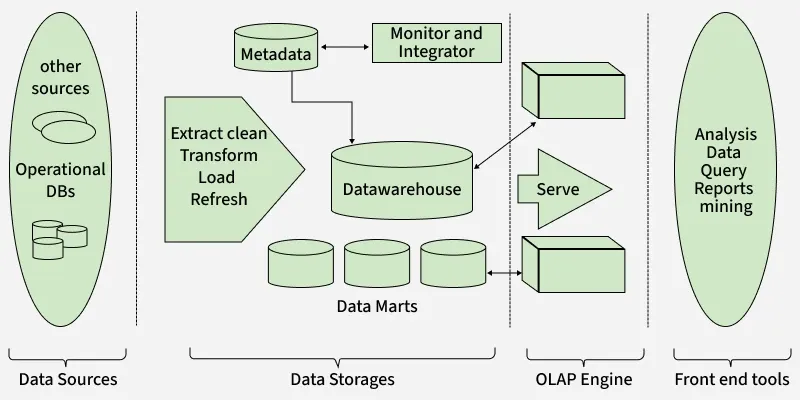
1. Bottom Tier
Contains:
-
Data sources
-
ETL tools
-
Data Warehouse database
Functions
-
Data extraction
-
Data cleaning
-
Data transformation
-
Data loading
2. Middle Tier
Contains OLAP servers.
Functions
-
Query processing
-
Data aggregation
-
Multidimensional analysis
3. Top Tier
Contains front-end tools for end users.
Examples
-
Dashboards
-
Reporting tools
-
Data mining applications
1.8 Data Warehouse Schema
A schema defines the logical structure of a Data Warehouse.
1. Star Schema
A Star Schema consists of:
-
One central fact table
-
Multiple dimension tables
The structure resembles a star.


1. Fact Table
Contains:
-
Numerical measures
-
Foreign keys
Examples
-
Sales amount
-
Quantity sold
-
Revenue
2. Dimension Tables
Contain descriptive information about business entities.
Examples
-
Product details
-
Customer information
-
Time information
3. Characteristics of Star Schema
-
Denormalized structure
-
Simple design
-
Fewer joins
4. Advantages of Star Schema
-
Faster query performance
-
Easy to understand
-
Efficient reporting
2. Snowflake Schema
A Snowflake Schema is an extension of Star Schema where dimension tables are normalized.

1. Normalized Dimension Tables
Dimension tables are divided into multiple related tables.
Example
Location dimension divided into:
-
City
-
State
-
Country
2. Features of Snowflake Schema
-
Reduced redundancy
-
Better storage efficiency
-
More complex joins
3. Advantages of Snowflake Schema
-
Reduced data duplication
-
Better data integrity
4. Disadvantages of Snowflake Schema
-
Slower query performance
-
Complex structure
3. Fact Constellation Schema
Fact Constellation Schema is also called Galaxy Schema.
It contains:
-
Multiple fact tables
-
Shared dimension tables

1. Multiple Fact Tables
Examples
-
Sales fact table
-
Shipping fact table
2. Shared Dimension Tables
The same dimension tables are shared among multiple fact tables.
Examples
-
Product dimension
-
Time dimension
1.9 OLAP (Online Analytical Processing)
OLAP is a technology used for fast multidimensional analysis of warehouse data.
1. Need for OLAP
1. Multidimensional Analysis
Data can be analyzed from multiple perspectives.
Example
Sales analysis based on:
-
Product
-
Region
-
Time
2. Decision Support
Helps management make strategic business decisions.
Example
Identifying profitable products and markets.
3. Fast Analytical Queries
OLAP systems are optimized for:
-
Aggregation
-
Summarization
-
Complex calculations
2. OLAP Operations
Multi-dimensional data cube

1. Roll-Up
Aggregates data from lower levels to higher levels.

Example
City sales → State sales → Country sales
2. Drill-Down
Moves from summarized data to detailed data.

Example
Yearly sales → Monthly sales → Daily sales
3. Slice
Selects a single dimension value.

Example
Sales data for the year 2025 only.
4. Dice
Selects multiple dimensions and values.

Example
Sales for:
-
Product A
-
West Region
-
Year 2025
5. Pivot
Rotates data axes for different data views.

Example
Converting rows into columns in reports.
3. OLAP Models
1. ROLAP (Relational OLAP)
Stores data in relational databases.
Features
-
Highly scalable
-
Handles large volumes of data
Disadvantages
- Slower query performance
2. MOLAP (Multidimensional OLAP)
Stores data in multidimensional cubes.
Features
-
Very fast query response
-
Precomputed aggregations
Disadvantages
- Higher storage requirement
3. HOLAP (Hybrid OLAP)
HOLAP combines features of ROLAP and MOLAP.
Features
-
Balance between speed and scalability
-
Summary data stored in cubes
-
Detailed data stored in relational databases
Advantages
-
Improved performance
-
Efficient storage usage