Q1. Explain with neat labelled diagram architecture of .NET Framework.
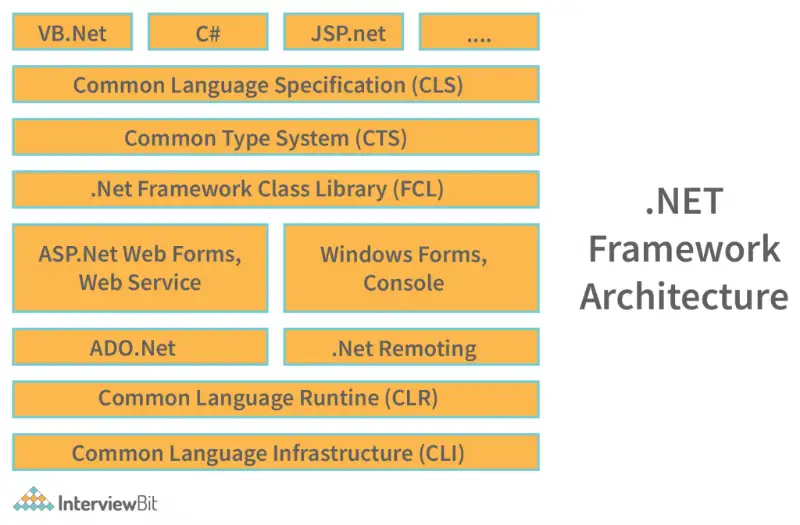
The .NET Framework architecture is a software development platform from Microsoft. It provides a controlled environment for developing and running applications. Its architecture is divided into several layers:
-
Common Language Runtime (CLR):
Acts as the execution engine. It manages memory, thread execution, code safety, exception handling, and garbage collection. -
Class Library (Base Class Library – BCL):
A rich library of reusable classes, interfaces, and APIs which provide support for file I/O, database connectivity, collections, web services, etc. -
Languages:
You can develop applications using multiple languages such as C#, VB.NET, and F#. These languages compile into Intermediate Language (IL) code. -
Application Types:
Includes Windows Forms, ASP.NET (Web apps), ADO.NET (Data access), WCF, WPF, etc.
Q2. Explain compilation model of .NET Framework technologies.
The .NET compilation model transforms source code into managed code that runs inside the CLR. The process happens in multiple stages:
-
Source Code Compilation:
Developers write programs in C#, VB.NET, or another .NET language. Each source code is compiled by its respective language compiler into Microsoft Intermediate Language (MSIL or IL). -
Metadata Generation:
Along with IL, metadata is produced. Metadata contains information about classes, methods, datatypes, and assemblies. -
Assembly Creation:
The IL code and metadata are stored in files called assemblies (DLLs or EXEs). -
Just-In-Time (JIT) Compilation:
When the program runs, CLR translates IL code into native machine code using JIT compilers. Different JIT versions exist (Normal JIT, Pre-JIT, and Econo JIT). -
Execution:
The machine code is executed by the CPU while CLR ensures security, garbage collection, and exception handling.
The advantage of this model is language interoperability, platform independence, and better runtime management. Unlike traditional compilation (where code compiles directly into native instructions), .NET uses IL, making applications more flexible and portable.
Q3. Explain different types of constructors and constructor inheritance in C# .NET with suitable code.
A constructor is a special method that initializes objects when they are created. In C#, constructors have the same name as the class and no return type.
Types of Constructors:
-
Default Constructor: No parameters. Initializes fields to default values.
-
Parameterized Constructor: Accepts arguments and initializes object properties accordingly.
-
Copy Constructor: Creates a new object as a copy of an existing object.
-
Static Constructor: Used to initialize static members of a class. Runs only once.
-
Private Constructor: Restricts object creation by external classes (used in Singleton pattern).
Constructor Inheritance:
In C#, constructors are not inherited directly. However, a derived class can call the base class constructor using the base keyword.
Example Code:
class Parent {
	public Parent() {
	       Console.WriteLine("Parent constructor called");
		   }
	}

class Child : Parent {
public Child() : base() {
	Console.WriteLine("Child constructor called");
	}
}

class Demo {
static void Main() {
	Child obj = new Child();
	}
}
“
Here, creating a Child object first invokes the Parent constructor, showing how constructor inheritance works through chaining.
Q4. Explain exception handling in C# with code for custom exception (DoNotEnterNegativeNumber).
An exception is an error that occurs during program execution, disrupting the normal flow. C# provides a robust mechanism for handling runtime errors using try, catch, finally, and throw.
Ways to handle exceptions in C#:
-
Try-Catch Block: To catch and handle exceptions gracefully.
-
Finally Block: Executes code irrespective of exceptions, often used for cleanup tasks.
-
Throw Statement: To explicitly raise exceptions.
-
Custom Exceptions: Developers can define their own exception classes by inheriting from
System.Exception.
Example Code:
using System;
class DoNotEnterNegativeNumber : Exception {
	public DoNotEnterNegativeNumber(string msg) : base(msg) {}
}

class Demo {
	static void Main() {
		 try {
		 Console.WriteLine("Enter a number:");
		 int num = Convert.ToInt32(Console.ReadLine());
		 if (num < 0){
			throw new DoNotEnterNegativeNumber("Negative numbers not allowed!");
		 }
		 Console.WriteLine("You entered: " + num);
		} catch (DoNotEnterNegativeNumber ex) {
				 Console.WriteLine("Custom Exception: " + ex.Message);
				 }
			finally { Console.WriteLine("Program Ended Safely."); } } }
This ensures programs continue to run smoothly even after unexpected inputs.
Q5. Write a code to read data from a text file using StreamReader class.
In .NET, file input/output is done using classes from the System.IO namespace. The StreamReader class is specifically designed to read characters from text files efficiently.
Steps to read a file:
-
Import
System.IO. -
Create a
StreamReaderobject with the file path. -
Read data using methods such as
ReadLine(),ReadToEnd(), orRead(). -
Close the stream to free resources.
Example Code:
using System;
using System.IO;

class ReadFileDemo{
	static void Main(){
		try{
			using (StreamReader sr = new StreamReader('sample.txt')){
			string line;
			while((line = sr.ReadLine())!=null){
				Console.WriteLine(line);
			}
			}
		}
		catch (FileNotFoundException){
			Console.WriteLine("File not found)
		}
		catch (Exception ex){
			Console.WriteLine(ex.Message);
		}
	}
}
This program reads all lines from sample.txt and prints them to the console. The using statement ensures the file stream is closed properly. Exception handling prevents crashes when the file doesn’t exist or is inaccessible.