- Switching in Computer Networks
- 1. Introduction
- 2. Types of Switching
- [[#2. Types of Switching#A. Circuit Switching|A. Circuit Switching]]
- [[#A. Circuit Switching#How It Works:|How It Works:]]
- [[#A. Circuit Switching#Example:|Example:]]
- [[#A. Circuit Switching#Advantages:|Advantages:]]
- [[#A. Circuit Switching#Disadvantages:|Disadvantages:]]
- [[#2. Types of Switching#B. Message Switching|B. Message Switching]]
- [[#B. Message Switching#How It Works:|How It Works:]]
- [[#B. Message Switching#Example:|Example:]]
- [[#B. Message Switching#Advantages:|Advantages:]]
- [[#B. Message Switching#Disadvantages:|Disadvantages:]]
- [[#2. Types of Switching#C. Packet Switching|C. Packet Switching]]
- [[#C. Packet Switching#Types of Packet Switching:|Types of Packet Switching:]]
- [[#C. Packet Switching#1. Datagram Packet Switching|1. Datagram Packet Switching]]
- [[#1. Datagram Packet Switching#Example:|Example:]]
- [[#1. Datagram Packet Switching#Advantages:|Advantages:]]
- [[#1. Datagram Packet Switching#Disadvantages:|Disadvantages:]]
- [[#C. Packet Switching#2. Virtual Circuit Packet Switching|2. Virtual Circuit Packet Switching]]
- [[#2. Virtual Circuit Packet Switching#Example:|Example:]]
- [[#2. Virtual Circuit Packet Switching#Advantages:|Advantages:]]
- [[#2. Virtual Circuit Packet Switching#Disadvantages:|Disadvantages:]]
- [[#2. Types of Switching#A. Circuit Switching|A. Circuit Switching]]
- 3. Comparison of Switching Techniques
- 4. Summary
Switching in Computer Networks
1. Introduction
Switching is the method used to forward data from the source to the destination in a network. It ensures efficient communication by managing how data is transmitted across network paths. Switching is essential for telephone networks, computer networks, and data transmission systems.
2. Types of Switching
A. Circuit Switching
- A dedicated communication path is established between sender and receiver before data transmission.
- The path remains reserved for the entire session, even when no data is being transmitted.
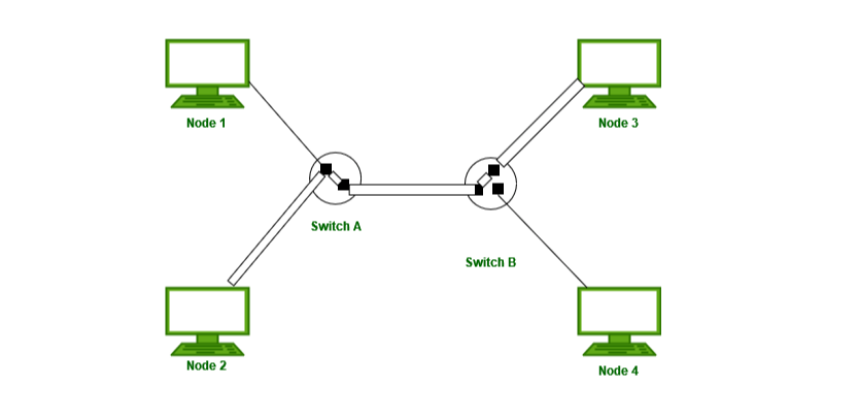
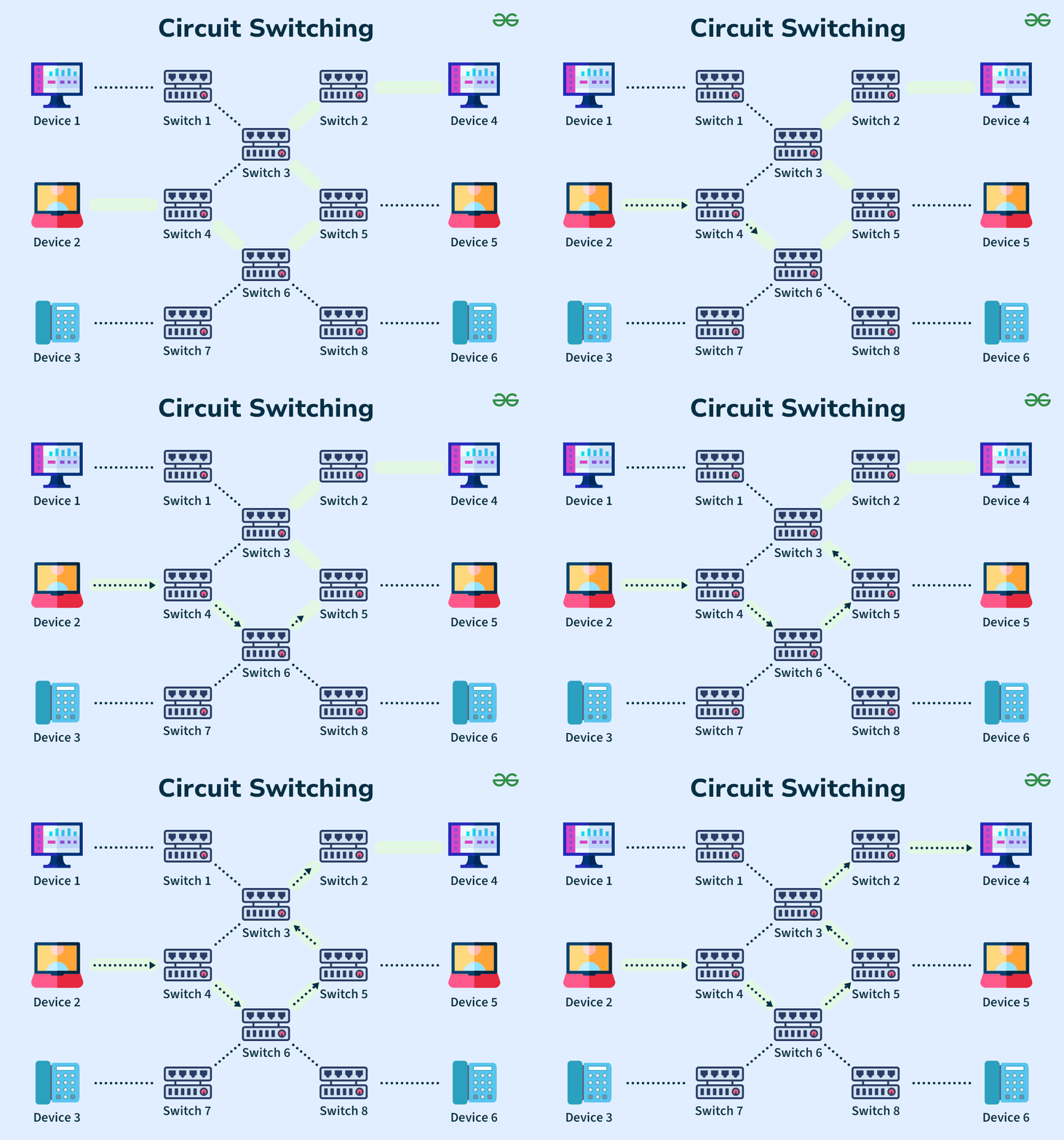
How It Works:
- Connection Establishment – A dedicated path is set up.
- Data Transfer – Continuous data flow happens.
- Connection Termination – The path is released after transmission.
Example:
- Traditional telephone networks (PSTN - Public Switched Telephone Network).
Advantages:
- Provides a fixed bandwidth for communication.
- Ensures no data loss and low latency once connected.
Disadvantages:
- Inefficient – The path remains reserved, even when no data is transmitted.
- Takes longer to establish a connection.
B. Message Switching
- A store-and-forward technique where an entire message is sent and stored at intermediate nodes before reaching the destination.
- No dedicated path is established.
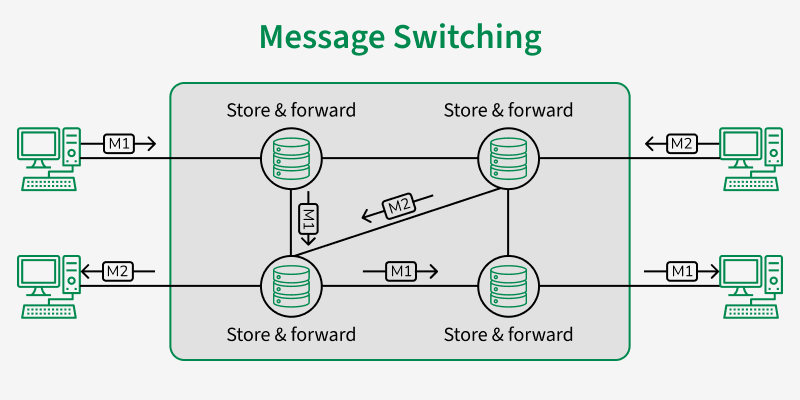
How It Works:
- The sender transmits a complete message to the first node.
- Each intermediate node stores the message and forwards it to the next node.
- The process repeats until the message reaches the destination.
Example:
- Email systems and telegraph networks.
Advantages:
- No need for a dedicated communication path.
- Efficient for long messages in store-and-forward applications.
Disadvantages:
- Delay is high since each node stores and forwards the message.
- Requires large storage capacity at each intermediate node.
C. Packet Switching
- Divides data into small packets before sending them across the network.
- Packets may take different routes to reach the destination.
- Each packet contains a header (destination address) and data.
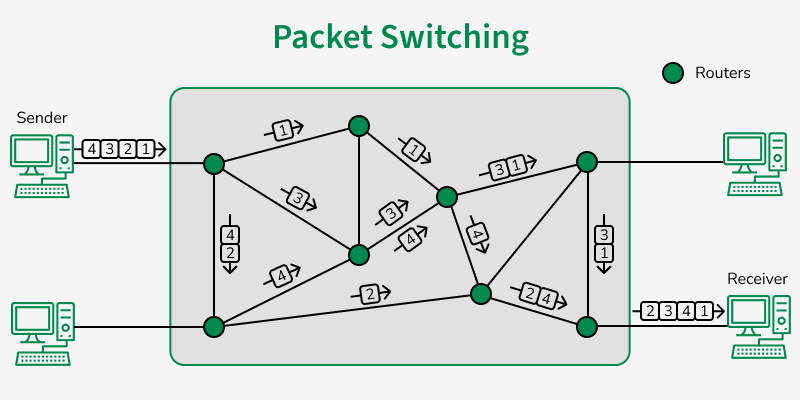
Types of Packet Switching:
1. Datagram Packet Switching
- Each packet is independent and may take different routes to the destination.
- Packets may arrive out of order and need to be reassembled.
Example:
- IP networks, UDP.
Advantages:
- Efficient – Utilizes multiple paths for better load balancing.
- Fault Tolerant – If one path fails, packets can use alternative paths.
Disadvantages:
- Reordering required at the destination.
- Higher processing overhead due to individual routing of packets.
2. Virtual Circuit Packet Switching
- A predefined logical path (virtual circuit) is established for packets before transmission.
- All packets follow the same route, ensuring proper sequencing.
Example:
- TCP, Frame Relay, MPLS (Multiprotocol Label Switching), ATM (Asynchronous Transfer Mode).
Advantages:
- Packets arrive in order, reducing reassembly effort.
- More reliable than datagram switching.
Disadvantages:
- Less flexible – If a path fails, all packets are affected.
- Setup time required before transmission.
3. Comparison of Switching Techniques
| Feature | Circuit Switching | Message Switching | Packet Switching (Datagram) | Packet Switching (Virtual Circuit) |
|---|---|---|---|---|
| Dedicated Path | Yes | No | No | Logical Path |
| Efficiency | Low | Moderate | High | High |
| Data Transmission Delay | Low (once connected) | High | Moderate | Low |
| Fault Tolerance | Low | High | High | Moderate |
| Example | Telephone networks | Email, Telegram | Internet (IP) | MPLS, ATM |
4. Summary
- Circuit Switching – Reserves a fixed path, like in telephone networks.
- Message Switching – Uses store-and-forward without a dedicated path.
- Packet Switching – Divides data into packets, using either datagram (independent packets) or virtual circuit (fixed logical path).
Would you like a real-world example of packet switching in the Internet?