- definition
- Need for the OSI Model
- Applications of the OSI Model
- OSI Model Layers
- [[#OSI Model Layers#1. Physical Layer|1. Physical Layer]]
- [[#OSI Model Layers#2. Data Link Layer|2. Data Link Layer]]
- [[#OSI Model Layers#3. Network Layer|3. Network Layer]]
- [[#OSI Model Layers#4. Transport Layer|4. Transport Layer]]
- [[#OSI Model Layers#5. Session Layer|5. Session Layer]]
- [[#OSI Model Layers#6. Presentation Layer|6. Presentation Layer]]
- [[#OSI Model Layers#7. Application Layer|7. Application Layer]]
- Real-World Example: Sending an Email
OSI Model (Open Systems Interconnection Model)
definition
- The OSI Model is a conceptual framework that standardizes network communication into seven layers.
- It helps understand how data travels from a source to a destination across a network.
- It standardizes networking, enables interoperability, and aids in troubleshooting
- Each layer performs a unique function and works with adjacent layers.
- It is widely used in networking technologies, security, and web applications.
Need for the OSI Model
- Standardization – Ensures different systems and devices can communicate.
- Interoperability – Helps different vendors develop compatible networking products.
- Troubleshooting – Isolates network problems to specific layers.
- Modularity – Allows updates to individual layers without affecting the entire system.
- Scalability – Supports both small and large-scale networks.
Applications of the OSI Model
- Network Design – Used as a reference for building networking hardware/software.
- Troubleshooting – Helps pinpoint network issues at specific layers.
- Security Implementation – Security measures are applied at different layers.
- Protocol Development – Guides the design of network protocols.
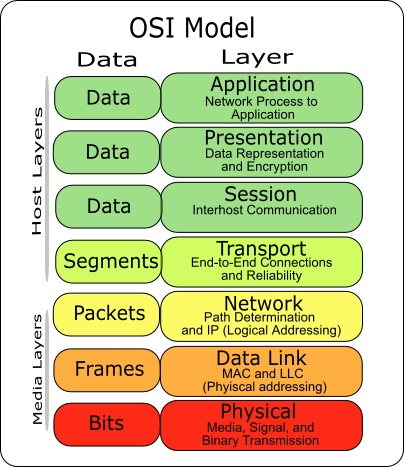
OSI Model Layers
| Layer | Function | Example Protocols |
|---|---|---|
| Physical | Transmission of raw bits | Ethernet, USB, Bluetooth |
| Data Link | Error-free data transfer | MAC, ARP, PPP |
| Network | Routing and addressing | IP, ICMP, RIP |
| Transport | Reliable data delivery | TCP, UDP |
| Session | Manages sessions | NetBIOS, RPC |
| Presentation | Data formatting and encryption | JPEG, MP3, SSL, TLS |
| Application | User interface and network services | HTTP, FTP, SMTP, DNS |


1. Physical Layer
- Function:
- Transmits raw binary data (0s and 1s).
- Defines cables, voltages, frequencies, and data rates.
- Examples: Ethernet cables, Wi-Fi signals, fiber optics.
- How it Works: Converts digital signals into electrical/light waves for transmission.
- Applications: Hardware design (network cards, modems), wireless communications (Wi-Fi, Bluetooth).
2. Data Link Layer
- Function:
- Error detection & correction in data transfer.
- MAC (Media Access Control) addressing for device identification.
- Examples: Ethernet, MAC addresses, PPP (Point-to-Point Protocol).
- How it Works: Splits data into frames and ensures error-free transmission between adjacent nodes.
- Applications: Switches and Bridges operate at this layer, Wireless LAN (Wi-Fi).
3. Network Layer
- Function:
- Logical addressing (IP addresses).
- Routing (finding the best path for data packets).
- Examples: IP (Internet Protocol), ICMP (Ping), Routers.
- How it Works: Breaks data into packets and routes them to the correct destination.
- Applications: Internet routing, Virtual Private Networks (VPNs).
4. Transport Layer
- Function:
- End-to-end communication between devices.
- Reliable (TCP) or Unreliable (UDP) delivery.
- Examples: TCP (Transmission Control Protocol), UDP (User Datagram Protocol).
- How it Works: Splits data into segments, ensures error checking.
- Applications: Web browsing (TCP for reliable transmission), Video streaming (UDP for fast, best-effort delivery).


5. Session Layer
- Function:
- Establishes, manages, and terminates sessions between applications.
- Examples: NetBIOS, RPC (Remote Procedure Call).
- How it Works: Synchronizes data transfer (e.g., resumes downloads after a failure).
- Applications: Remote login (SSH, Telnet), Online gaming.
6. Presentation Layer
- Function:
- Data formatting, encryption, and compression.
- Examples: SSL/TLS (Encryption), JPEG, MP3, GIF (Data Formats).
- How it Works: Converts data between different formats (e.g., encoding/decoding).
- Applications: Secure web browsing (HTTPS uses TLS), Video streaming (MP4 format conversion).
7. Application Layer
- Function:
- Provides services to end-users (file transfer, web browsing, email).
- Examples: HTTP, FTP, SMTP (email), DNS.
- How it Works: Sends requests and receives responses from network services.
- Applications: Web Browsing (HTTP/HTTPS), File Sharing (FTP).
Real-World Example: Sending an Email
- Application Layer (7) – User writes an email using Gmail (SMTP protocol).
- Presentation Layer (6) – The email is encrypted (TLS).
- Session Layer (5) – A session is established between sender and receiver.
- Transport Layer (4) – The email is broken into segments (TCP).
- Network Layer (3) – The IP address of the recipient is determined.
- Data Link Layer (2) – Data is packed into frames with MAC addresses.
- Physical Layer (1) – Data is transmitted as electrical signals through cables or Wi-Fi.